Automated Competitor Pricing Page Monitoring
Cleaning pricing data is harder than fetching it, and silent failures matter most.

What a pricing page contains and why scraping it cleanly is harder than it looks
A pricing page looks like three boxes and three numbers. A pricing page looks like three boxes and three numbers, but it isn't. Tier names, per-seat prices, feature gates buried in footnotes, a monthly/annual toggle that swaps numbers through JavaScript, promo banners that show up for two weeks and vanish, contract-term fine print, positioning copy that shifts tone without touching a single price: all of it lives on one page, and none of it moves on the same schedule. That mismatch, not the HTML itself, is what breaks most scrapers.
Plenty of SaaS pricing pages don't hand you a price on the initial load. They render it client-side, pulling the number from an internal API call after the page finishes loading. Sending a plain HTTP request gets you a shell with no numbers in it, the digital equivalent of ordering a burger and getting handed an empty bun.
High-traffic marketing pages also sit behind rate limiting, CAPTCHAs, and behavioral fingerprinting, because companies don't love being scraped by their own competitors. Redesigns break things quietly, too. A competitor tweaks their CSS, the class names your scraper depends on disappear, and the scraper keeps running anyway. It just returns nothing useful, while the team on the other end assumes silence means nothing changed. A commonly cited breakdown of the traditional scraping model puts roughly 20% of effort into building a scraper and 80% into babysitting it after layout shifts break it. Layout instability, not the initial build, is what eats the budget, and any team that budgets for the build and not the babysitting is going to run over.
Raw HTML makes this worse before it makes it better. A pricing page's markup is a wall of <div> tags and inline styles with the actual information buried somewhere inside, and none of that is usable for comparison. What the pipeline needs instead is field-level data: tier name, price, billing cadence, feature list, each one a named field, not markup soup. Clean, in this context, means Markdown or JSON with labeled fields, something a downstream system, or a language model, can reason about without guessing.
The pipeline model: four layers every monitoring system needs
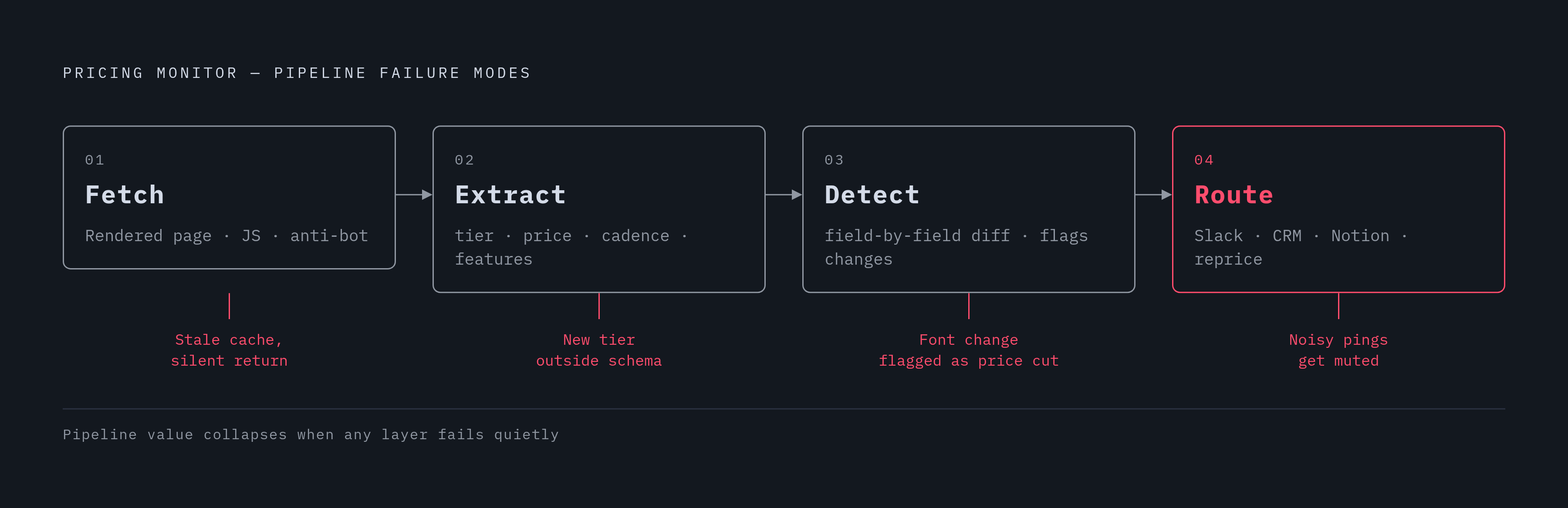
Split the problem into four layers. Each does one job, and the moment a team mixes their responsibilities is the moment the system starts lying to them quietly instead of loudly.
Fetch pulls the rendered page on a schedule, handling JavaScript execution, proxies, and anti-bot defenses along the way.
Extract turns that raw content into structured, named fields: tier, price, cadence, feature list. Not a side-by-side diff of two HTML files. Actual fields.
Detect compares the current structured snapshot against the last one and pinpoints what moved, such as a price cut, a new tier, a feature pulled from a plan, or copy that shifted tone.
Route pushes a structured alert, with context attached, to wherever a human actually makes a decision: Slack, the CRM, Notion, or a repricing engine.
Each layer fails on its own, and it usually fails quietly. A fetch might return a stale cached page and call it a day. An extractor might miss a brand-new tier because it wasn't in the schema. A detector might flag a font-size change as a "pricing update," and nobody notices the problem until the alerts start looking like spam and everyone tunes them out.
AI agents belong in the extraction and detection layers, not bolted onto alerting as an afterthought. The agent figures out which fields matter, adapts when the layout shifts under it, and writes a plain-English summary of what changed. Most setups run this as two stages: one stage collects raw content and manages the infrastructure, the other hands that content to a language model that parses and compares it. Skipping straight to alerting without building extraction first produces a stream of noisy, half-reliable pings that everyone eventually mutes. That's the most common mistake teams make when they rush this, and it's an easy one to avoid if extraction gets built before anyone touches Slack integrations.
Scheduling, frequency, and the fetch layer's infrastructure requirements
Monitoring competitor pricing pages every 1 to 4 hours is a reasonable operational cadence, and there isn't much of a case for going slower on a page that actually matters to the business. Faster makes sense during a promotional event or a launch window. Slower is fine for a competitor whose enterprise pricing hasn't budged in a year. Most setups run on a fixed schedule, though event-driven triggers (a spike in a competitor's ad spend, a product launch signal) can justify checking outside the normal window.
Any page that toggles between monthly and annual pricing, or loads numbers through an API call after render, needs a headless browser or a rendering-capable scraping tool. A plain HTTP fetcher won't see the numbers. It grabs the skeleton and misses the meat.
Some pricing pages show different numbers depending on where the request comes from, so a system watching a specific market needs to route requests through that geography. And because pricing pages are prime bot-detection targets, the fetch layer has to manage request pacing, rotate user agents, and get past CAPTCHAs without the whole job dying silently mid-run.
One rule doesn't bend here: a scraper that returns a cached or partial page and calls it a success is worse than one that fails loudly. The system has to tell the difference between "the page genuinely didn't change" and "the fetch broke and nobody knows." The first is fine. The second is a false sense of security, and it's the more dangerous of the two by a wide margin, because nobody goes looking for a problem they think is already solved.
Production pipelines tend to favor webhooks over polling. Instead of a script sitting around waiting on an API response, the fetch job fires off and results come back via webhook when they're ready. That decouples scheduling from processing, so one slow fetch doesn't jam up the whole queue behind it.
Extracting structured fields from a pricing page instead of diffing raw HTML
Storing a screenshot or a raw HTML snapshot and diffing the two sounds simple. That simplicity is why it fails: it flags a rotating banner or a cookie notice as a "change" and misses the actual story, like a feature quietly moving from the Pro tier to Enterprise without a single word of visible text changing anywhere on the page.
The extraction layer should hand off a JSON object per tier instead: tier name, price, billing cadence, feature list, promotional text, footnotes. That way detection compares structured data field by field, instead of eyeballing two blobs of markup for differences and hoping nothing slips through.
Language models are well suited to this specific job. Feeding a model cleaned page content plus a schema (tier name, monthly price, included features) returns structured JSON, regardless of whether the underlying layout got a facelift last week. ScrapeGraphAI built a framework around exactly this idea, letting developers describe what they want in plain English while the model builds the extraction logic itself. The project has passed 15,000 GitHub stars doing it.
That approach also fixes the layout-breakage problem for free, which is the bigger win. A scraper built around fixed page positions snaps the moment a competitor redesigns their page, because it was never reading meaning, just position on a grid. An extractor working off semantics keeps working because it identifies "this is the price" by what it says, not where it sits on the page. Researchers at McGill University found in 2025 that extraction using one model held accuracy between 97.2% and 100% even when the underlying page structure changed out from under it. GroupBWT reported building an AI-driven extraction system that cut maintenance work substantially, simply by having agents notice a layout shift and adjust on their own instead of waiting days for an engineer to patch a selector.
Format matters on the way out, too. Markdown is what a language model wants to read when it's doing comparison work. JSON is what alerting logic and data warehouses want to ingest. The cleanest setups produce both and let whoever's consuming the data pick.
Detecting what changed and generating actionable alerts
Once two structured snapshots exist, detection compares them field by field, checking for a tier price drop, a new tier appearing at a specific price point, or a feature moving from Professional to Enterprise. That part is mechanical, and it should stay mechanical. A diff script doesn't need opinions.
Interpretation is where the value actually sits, and it's the part a plain diff script can't do. A language model at this stage can connect the dots, for instance, noting that dropping the free tier probably signals a move upmarket, rather than just logging that a field's value changed from one thing to another. A model in this layer produces an insight instead of a log entry, which is the entire reason to put a model there instead of a script.
Visualping's integration with Zapier shows what the full detection-to-routing chain looks like in practice: an HTML change gets flagged, Zapier kicks off a workflow, an AI model compares the old pricing structure to the new one, drafts a battle card update with counter-positioning, and posts it straight to Slack while updating a Notion doc. Setup runs around 15 minutes. Once it's live, each alert takes about 2 to 3 minutes of human attention, roughly the time it takes to read a Slack message and decide who needs to see it.
A genuinely useful alert shows the old value next to the new one, names which tier got hit, spells out what the move probably signals competitively, suggests a couple of talking points, and flags which customer segments are most exposed. Routing should match the audience, so sales gets a Slack message with talking points baked in, the competitive intelligence lead gets the full diff in Notion or Airtable, and a CRM task gets created automatically for a sales leader to review.
Alert fatigue is the failure mode nobody plans for and everybody hits eventually. A detection layer tuned too sensitively will flag a banner color change as a "pricing update," and after the third false alarm, people stop opening the notification. Filtering by field type (price only, or tier structure only) keeps the signal-to-noise ratio somewhere reasonable.
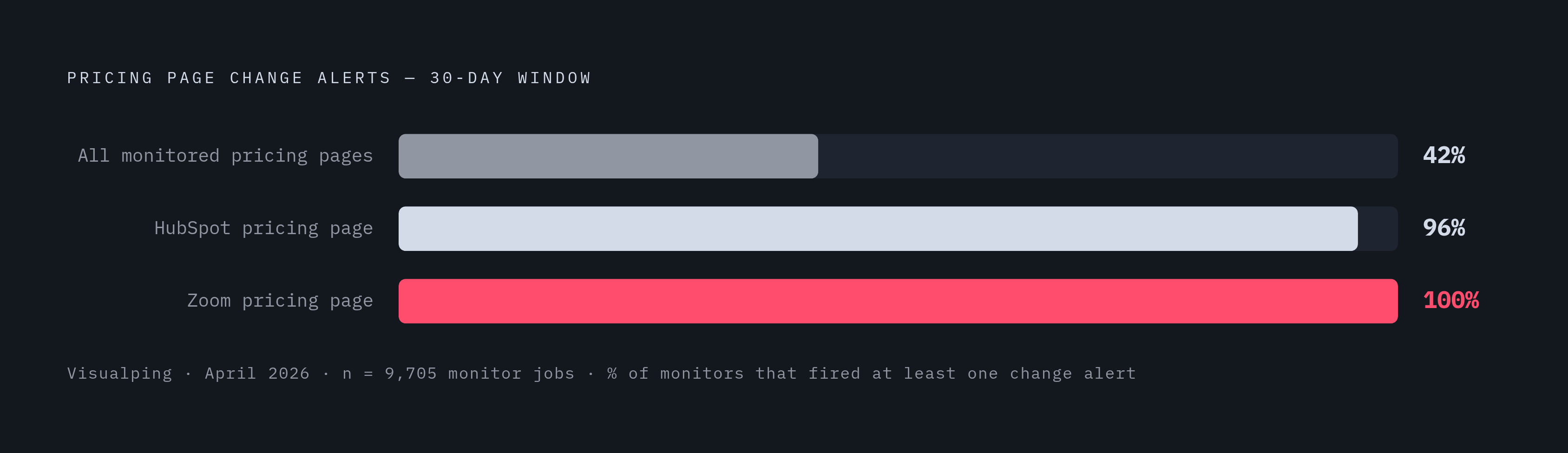
In an April 2026 sample from Visualping covering 9,705 monitor jobs watching competitor pricing or plan pages, 42% recorded at least one page-change alert within 30 days. Among monitors tracking HubSpot's pricing page specifically, 96% alerted; on Zoom's, it hit 100%. A quarterly manual review catches only a sliver of that activity, and that gap is the entire argument for automating this.
Tools that handle the full pipeline or specific layers
No single product owns every layer here, and picking one means picking a tradeoff, not a winner. The right choice depends on the goal: turnkey pricing intelligence, a programmable scraping setup, or a composable framework built in-house.
Change monitoring and alerting (mostly Layers 3 and 4)
Visualping monitors competitor sites, pricing pages specifically, every 1 to 4 hours, and triggers on any HTML change it detects. Over 40,000 Visualping users picked price tracking as their main use case during onboarding; another 73,000 track stock availability. The free plan covers 5 pages and 150 checks a month with AI change summaries and webhook alerts; paid plans start around $10 a month billed annually. It fits teams that want visual proof of a change fast and a Zapier/Slack workflow running in roughly 15 minutes without writing a line of code. The monitoring layer is sharp, but structured field extraction still needs an AI model bolted on in the Zapier step, since it isn't a native JSON extractor out of the box.
Fluxguard sits in the same change-monitoring category, with a free plan covering 3 sites; beyond that, paid plan pricing requires a demo. Beyond that, pricing specifics are demo-only.
Managed pricing intelligence (Layers 1 through 3, fully outsourced)
Skuuudle runs as a fully managed price intelligence service, collecting data daily, weekly, or up to hourly, with no self-serve free tier: demo and custom quote only. This fits enterprise retailers who'd rather hand the entire pipeline to a vendor than run any piece of it themselves.
Dedicated e-commerce pricing platforms (Layers 1 through 4, built for product catalogs)
Prisync's Professional plan runs $99 a month for up to 100 products, with price checks three times a day, stock monitoring, and unlimited competitor tracking. Premium jumps to $199 a month for 1,000 products and adds a dynamic pricing engine and API access, billed at an extra 20% on top. Platinum covers up to 5,000 products with instant alerts and MAP monitoring, at pricing available on request. There's also a Channel Based structure starting at $199 a month for a single sales channel, with extra channels billed separately. A 14-day free trial requires no credit card. This is a solid match for e-commerce stores tracking products at the SKU level, but the core approach, matching a single URL to each product, doesn't map onto SaaS pricing pages. SaaS plans don't have SKUs or EAN codes to match against, so this tool solves a different problem than the one this article is about, and forcing it into that role wastes the parts of it that actually work well.
Pricefy says it monitors 125,000 online stores daily and tracks 80 million product URLs. The free plan covers 50 SKUs and 5 competitors with daily updates. Starter runs $49 a month (or $37 billed annually) for 100 SKUs and unlimited competitors. Pro runs $99 a month for 2,000 SKUs and adds dynamic repricing. Business runs $189 a month for 15,000 SKUs with autopilot repricing and MAP monitoring, and Enterprise runs $499 a month for 25,000 SKUs with dedicated support. Product matching starts with barcodes (EAN, GTIN, UPC) and falls back to AI visual matching when a barcode isn't available, so nobody's typing in URLs by hand. Alerts go out over email, Slack, or webhook, and repriced numbers can push out to Google Shopping, Meta, Amazon, TikTok, and other channels. Like Prisync, this is built for retailers running catalog-scale repricing, not for tracking a handful of SaaS competitor pages. Picking it for that job means fighting the tool's whole design the entire way, and there are cheaper, simpler ways to lose that fight.