Building a Competitive Intelligence Dashboard From Web Data Pipelines
Automate competitor monitoring with pipelines built to scale, not spreadsheets.
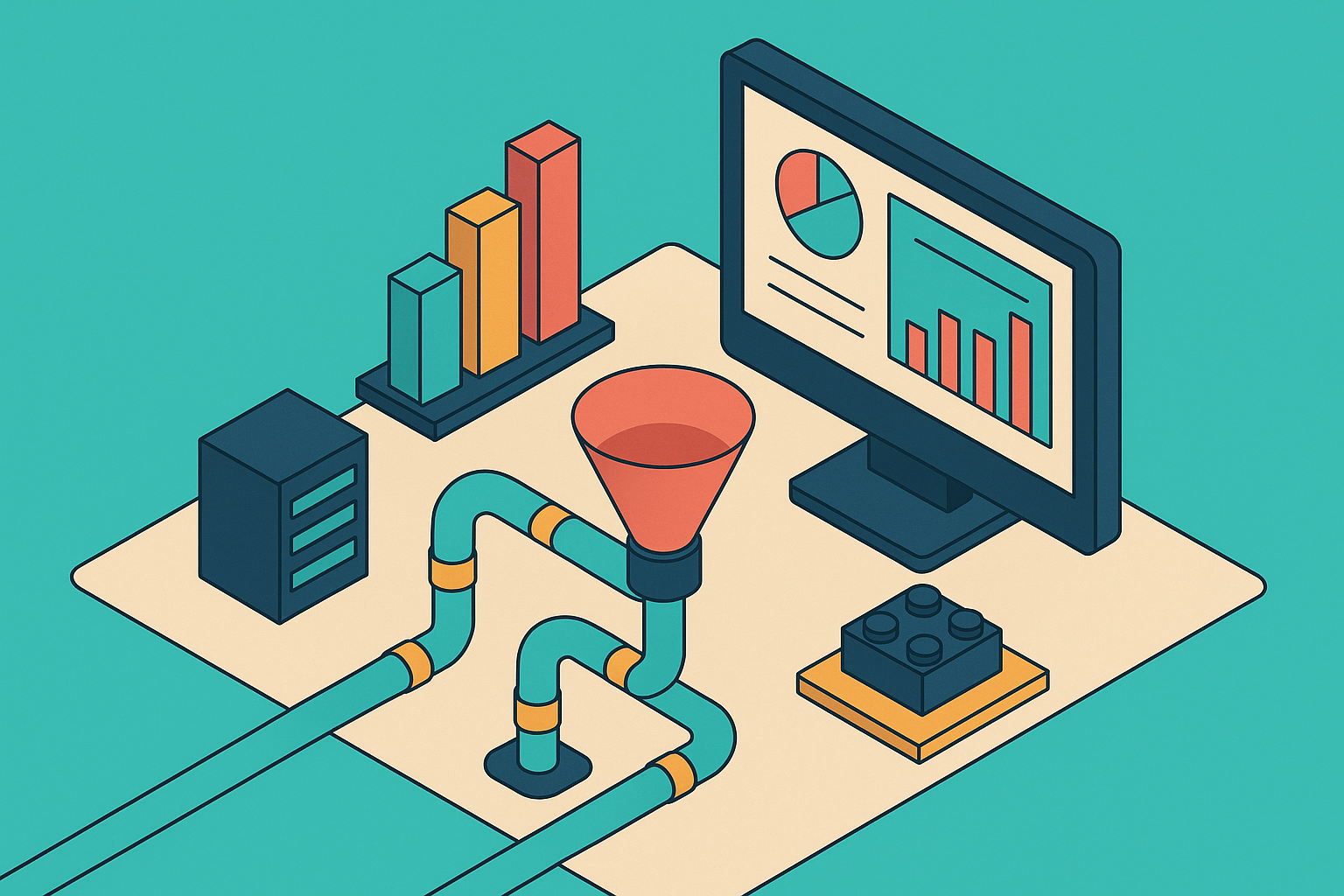
Competitive intelligence used to mean a quarterly deck somebody built by hand, full of screenshots and a note that said "as of last Tuesday." That model is dead. What replaced it is a dashboard that updates itself, tells you what changed, and (in theory) tells you what to do about it. That dashboard is only as good as the pipeline feeding it, and most teams bought the software without fixing the plumbing underneath.
Per research from Improvado, 40% of teams abandon their CI tools within twelve months. That's not a tooling problem you fix by switching vendors. It's a structural one. Three failure modes show up again and again: alert fatigue (tools firing 50-plus alerts a week that nobody opens), integration gaps (insight sitting in a dashboard that sales and product never see), and category mismatch (buying a social listening tool when the job called for a market intelligence platform, or the reverse). Layer on top of that: only 18% of companies have achieved unified marketing measurement, and the bottleneck is getting CI to actually connect to performance systems. It's getting CI to actually connect to performance systems.
A dashboard is just a presentation layer. It shows you what the pipeline behind it collected. If that pipeline is stale, unstructured, or dumping noise into every channel it touches, the dashboard will look exactly as bad, no matter how nice the charts are. This piece is about the infrastructure that has to exist before software means anything. It's about the infrastructure that has to exist before software means anything.
What a production-grade CI pipeline needs to do
A real CI pipeline runs itself. Set it up once, and it keeps collecting, structuring, and delivering competitor data without a human clicking refresh. That's the whole point. Anything short of that is just a spreadsheet with better fonts.
There are four stages a pipeline has to handle, and skipping any one of them breaks the chain:
Extraction: pulling structured data out of pages heavy with client-side scripting, dynamic pricing tables, and blog posts with zero consistent formatting
Scale is where this falls apart fast. A product marketer can track three competitors by hand without much trouble. Ten competitors, and the process gets inconsistent, some get checked weekly, some get forgotten. Fifty competitors, and critical signals either arrive too late to act on or never surface at all.
Tools like Klue and Crayon do a solid job serving product marketing and sales enablement teams, and Contify leans toward broader strategic and enterprise market intelligence. But technical teams building internal tools or AI agents hit a ceiling with all of them fast: you can't pipe the output into a data warehouse, can't trigger a custom agent workflow off it, can't define your own output schema. For those teams, CI is an engineering problem that needs raw API building blocks, not a pre-configured SaaS dashboard. It's an engineering problem that needs raw API building blocks, not a pre-configured SaaS dashboard.
Whatever gets built, it needs to hit six marks: continuous monitoring, change detection that actually means something, AI summarization, help interpreting what the summary implies, push-based delivery (not "log in and check"), and low day-to-day upkeep. Treat that list as the exam a homegrown pipeline has to pass.
The four CI data categories worth monitoring (and the ones that generate noise)
Pricing pages, product and feature updates, hiring and job postings, and investor or funding announcements carry almost all the signal worth paying for.
Each one tells a different story. Pricing pages show revenue moves and positioning shifts in real time. Job postings reveal where a competitor is quietly staffing up, or quietly not, which says a lot about where they think the next eighteen months are headed. Changelogs and release notes track the pace and direction of product innovation. Funding and investor pages hint at runway, strategic priorities, and whether an acquisition might be coming.
Now the part that gets ignored constantly: monitoring every blog post and every press mention doesn't make a CI system smarter. It makes it louder. Broad monitoring is the root cause of alert fatigue, full stop. A system that flags 50-plus things a week trains its own users to stop reading it.
Good CI reports show what changed since the last cycle. Not everything that happened. The value sits in pattern recognition over time, not in a real-time firehose that treats every event as equally urgent. Take a competitor that, over four consecutive reporting cycles, launches new AI capabilities, hires an AI lead, acquires a small AI startup, and rebrands its messaging around AI. No single one of those alerts tells the real story. Strung together across cycles, the pattern becomes obvious: this company is betting the next chapter of its roadmap on AI. That story only shows up when someone (or something) is looking across cycles, not within one.
The practical move: scope the monitoring layer tightly by URL category before writing a single line of pipeline code. Decide what matters before deciding how to collect it.
How the extraction layer works (and why it breaks without the right infrastructure)
Before a pipeline can extract anything meaningful, it needs the page to load the way a real person's browser would load it. JavaScript has to run. Anti-scraping defenses have to get past. The response has to actually match what shows up on screen, not some stripped-down version missing half the content.
Skip this layer, and every stage built on top of it starts reporting phantom failures. Most "why is our CI pipeline broken" debugging sessions trace back to this exact spot, not to the fancy AI enrichment step everyone assumes is the culprit.
Reliable extraction needs a handful of things working together: residential or mobile proxies with control over geography, browser fingerprinting that holds up across TLS, HTTP/2, and header details, JavaScript rendering for single-page apps, bypass logic for defenses like Cloudflare, DataDome, PerimeterX, Akamai, and Kasada, and retry logic with backoff built in so one failed request doesn't take down the run.
Traditional scrapers rely on a fixed CSS selector or a specific element ID. That works fine until a designer redoes the page layout, at which point the scraper breaks silently and nobody notices until a report shows up empty. AI-powered extraction sidesteps that. Describe what data matters in plain English, and the model reads the page for meaning rather than hunting for a specific tag. Layout changes stop being a five-alarm fire.
Research has found that AI extraction methods held 98.4% accuracy even after page structures changed, and setup time dropped from weeks down to hours. That's not a marginal improvement, that's the difference between a pipeline someone babysits and one that runs itself.
When building extraction into an agent workflow, check for an official API or an XHR JSON response first, look for embedded JSON second, fall back to a browser agent like Playwright when rendering handled by client-side scripting or login is required, and save extraction based on one model for small, reviewed cleanup jobs. It's a last resort, not a starting point.
The extraction tool landscape for CI pipelines in 2026
Six extraction tools got benchmarked against Cloudflare, Akamai, single-page apps heavy with client-side scripting, and e-commerce targets in an independent benchmark published in 2026. The leading provider in that test hit a 75% overall success rate across those hostile categories, which tells you something important on its own: even the best tools in 2026 are not clearing every target cleanly. Hostile sites are hostile for a reason.
A few of the notable names in that space, and where each one tends to fit:
- Zyte priced its pay-as-you-go simple HTTP requests at $0.13 per 1,000, making it the cheapest entry point on the list. It suits Python and Scrapy pipelines running through managed cloud execution.
- ScrapeGraphAI uses LLMs to read page content semantically, so instead of maintaining a list of selectors, someone just describes the data they want in plain language.
- CrawlForge is built MCP-native, with tools discoverable directly through the Model Context Protocol, no glue code required. It's designed to plug into agent loops running through Claude, Cursor, OpenAI Agents, LangChain, and the Vercel AI SDK.
Picking between them comes down to which stage of the pipeline needs solving. Lightweight HTTP tools handle the easy pages fine. Managed, browser-based tools earn their cost on hostile targets. MCP-native tools make sense when the goal is tight integration into an agent loop. Open-source options give maximum control at low volume, at the cost of someone maintaining the thing.
Why output format determines whether an AI layer can reason over what the pipeline collects
Raw HTML is close to the worst possible format to hand an AI model. Most of the content is markup the model doesn't need: script tags, navigation menus, ad blocks, none of which carry any actual signal. The model burns tokens parsing junk instead of reading substance.
Markdown fixes a lot of that. It cuts token usage by up to 80% compared to raw HTML, and its structure (headings, lists, links) actually helps a model understand what it's reading, rather than just feeding it a wall of text. Converting a documentation page from HTML to markdown can cut token consumption substantially. That's not a rounding error, that's the difference between a pipeline that's affordable to run daily and one that isn't.
Format choice should match the job:
- Markdown works best for anything meant to be summarized, searched, or fed into a retrieval system: it keeps the structure that carries meaning and drops the styling that doesn't.
- JSON fits structured data, pricing tables, product specs, anything where the relationship between fields matters more than the prose around them.
- Plain text covers simple, unformatted content where there's no real structure to preserve in the first place.
Whatever format gets chosen, clean the HTML first, strip navigation, ads, and boilerplate before converting anything. Feeding a model unclean input and expecting clean output is wishful thinking.
The emerging llms.txt standard is worth watching. robots.txt tells crawlers what they can access. sitemap.xml lists canonical URLs for search engines. llms.txt proposes something new, a curated Markdown index meant specifically for AI tools that support it. That's a small signal pointing at a bigger shift: format standardization is becoming infrastructure, not an afterthought bolted on at the end. Decide on output format when the pipeline gets designed, not after it's already collecting data nobody can use cleanly.
Build vs. buy decisions for the monitoring and infrastructure layer
Building in-house carries hidden costs a managed service doesn't. Managed services carry a ceiling in-house builds don't have. Neither side of that trade is free, and pretending otherwise is how budgets go sideways.
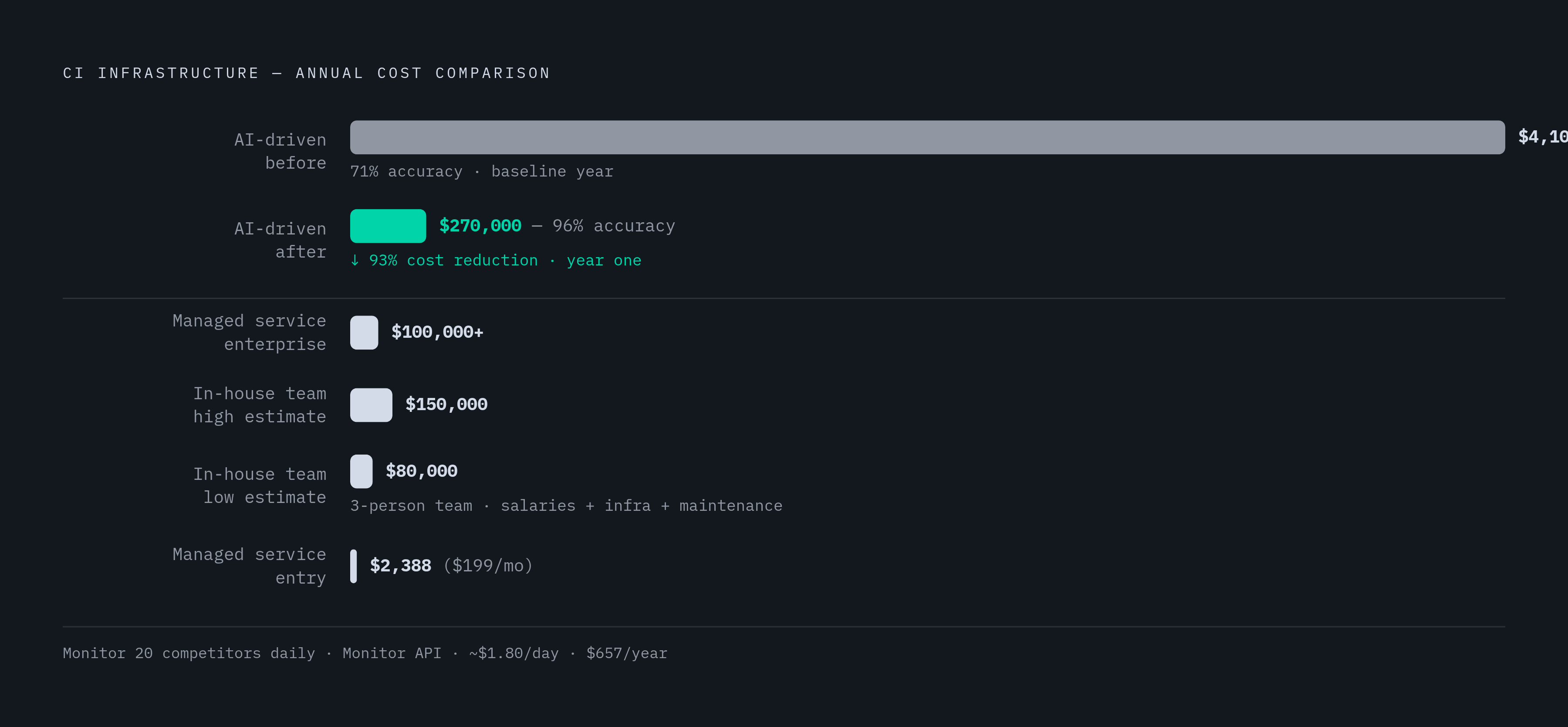
Some rough numbers to anchor the decision. A three-person engineering team running an in-house build costs somewhere between $80,000 and $150,000 a year, once salaries, infrastructure, and ongoing maintenance get counted. Managed scraping services run from around $199 a month for basic needs up to custom enterprise pricing that can top $100,000 annually at high volume. And before a single record even gets collected, maintenance labor on a DIY scraper (fixing broken selectors, chasing layout changes) runs $300 to $1,500 a month at a $75-an-hour developer rate.
A hybrid setup makes sense at high volume with a mix of easy and hostile targets. Self-host the easy 80%, the simple HTTP pages that don't fight back, and route the hostile 20% through a managed, proxy-backed path. That only holds together if both paths run through one shared API. Split them across fragmented tools, and the architecture falls apart the first time someone has to debug which path a failure came from.
For teams leaning toward self-hosting: a small Rust binary with a low idle footprint can handle roughly a million pages a month on a small VPS, running $10 to $50 a month in compute, at zero license cost. That's a real option, but only worth it for organizations with dedicated infrastructure engineers, strict data residency rules, or scraping volume already costing more than $5,000 a month on a managed platform.
The clearest ROI evidence: one enterprise, per reporting from tendem.ai, replaced a team of 15 manual scrapers with an AI-driven system, dropping first-year costs from $4.1 million down to $270,000, while data accuracy climbed from 71% to 96%. That's not a marginal efficiency gain, that's a different order of magnitude. For a smaller anchor point: monitoring 20 competitors daily through a single Monitor API runs around $1.80 a day. Cheap enough that the real cost of a bad CI system isn't the API bill, it's the bad decisions made on stale data.
Assembling the pipeline: how discovery, extraction, monitoring, and enrichment connect end to end
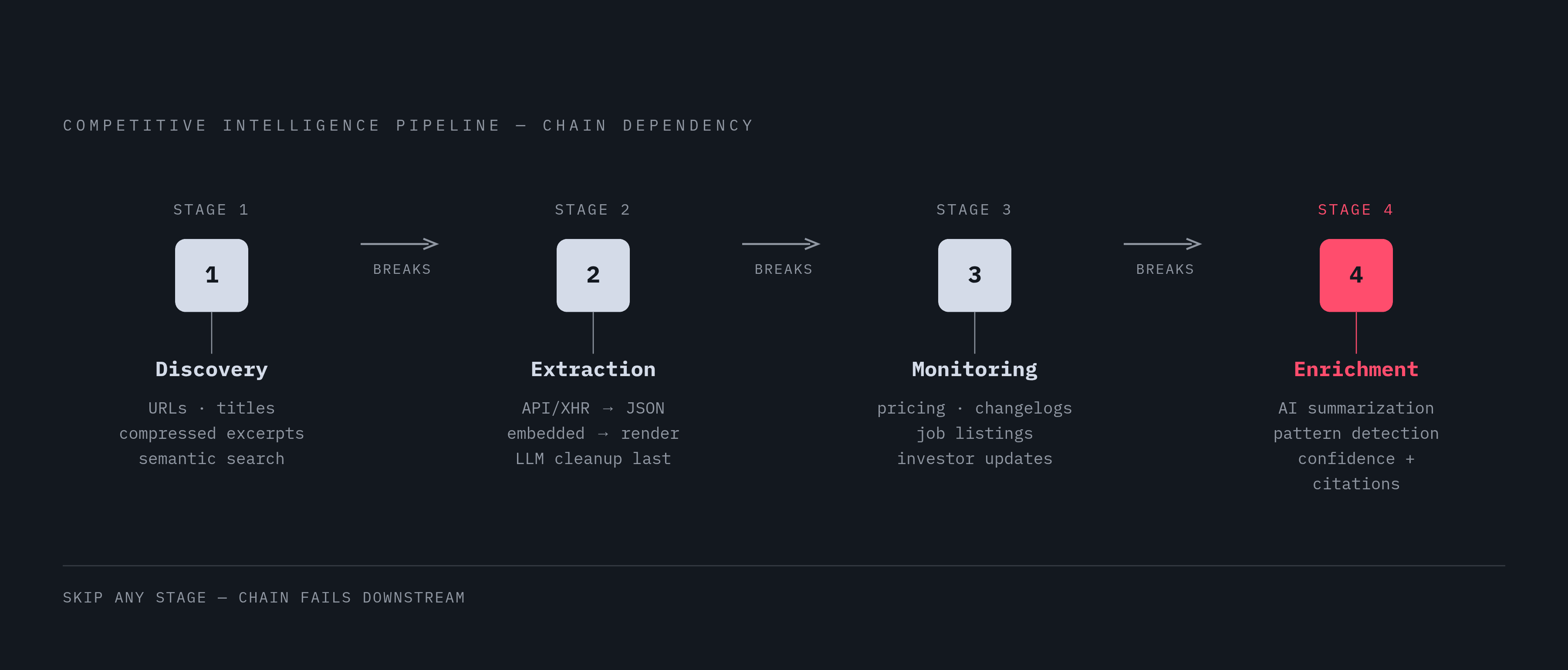
Put the four stages together, and here's how they actually talk to each other.
Discovery starts with semantic search across the open web instead of a static list of URLs someone updates twice a year. Describe what's being looked for, get back ranked results built for machine consumption, not for a human scrolling a search page. Concrete targets: competitor pricing pages, changelogs, press releases, job listings, investor updates. Each result should come back with a URL, a title, and a compressed excerpt relevant to the actual goal. Signal, not noise, from the very first step.
Extraction follows the layered priority order from earlier: API or XHR JSON first, embedded JSON second, browser rendering third, LLM cleanup last. Output format gets decided right here, not bolted on afterward: Markdown for anything headed toward summarization, JSON for anything with structured fields that need storing.
Monitoring stays narrow. Continuous change detection on the high-signal pages identified earlier, not broad polling across every page a competitor owns. Meaningful change detection means flagging a pricing shift or a new hire in leadership, not flagging every paragraph that got rewritten for SEO. Zyte's 2026 Web Scraping Industry Report notes that AI tooling now touches the entire scraping lifecycle, planning, crawling, unblocking, extraction, and validation, cutting down the manual maintenance work at every link in that chain.
Enrichment runs an AI summarization layer over the clean Markdown input, producing interpretation rather than a raw list of alerts. This is also where pattern detection across multiple cycles happens, the four-report AI pivot example from earlier is exactly this stage doing its job. Confidence scores and source citations get attached to every output here, so nobody downstream is left wondering whether to trust it.
One concrete example pulls all four stages together: a daily schedule kicks off a sales analysis API that tracks price history across hundreds of competitor products. An AI agent analyzes the price changes, cross-references Best Sellers Rank positions, and flags new product variations as they appear. The final output isn't a raw data dump, it's a short automated report, emailed straight to the pricing team, highlighting only what's actually worth acting on.
The pipeline ends with delivery. Not with a dashboard sitting open in a browser tab nobody checks.